Trigger a GitOps update
With automated sync enabled, the Git repository is now the source of truth for catalog. To roll out a change we don't touch the cluster at all. We change the manifests in CodeCommit and let Argo CD reconcile. Let's scale the catalog Deployment from 1 replica to 2 and watch it deploy.
First, clone the CodeCommit repository into the IDE. git-remote-codecommit lets git authenticate to CodeCommit using your ambient AWS credentials through the codecommit:: remote helper, with no SSH keys and no Git credentials. The rm -rf first clears any previous clone so the step is safe to re-run:
Confirm the current replica count in the repository:
replicas: 1
Update it from 1 to 2:
replicas: 2
Commit and push the change. Run the whole block as one chained command, because Git needs user.email and user.name set in this repository before the commit, and the chain (&&) guarantees the identity is in place before git commit runs:
If you split the block and run git commit standalone, you may see fatal: unable to auto-detect email address, which means the git config lines didn't run yet in the same shell. Just re-run the chained block above.
That's the entire change: a single commit to Git. Argo CD polls the repository on its own schedule and reconciles when it detects the new revision. To avoid waiting up to around 3 minutes for the next poll, ask Argo CD to refresh the Application now:
application.argoproj.io/catalog annotated
Wait for the rollout to complete with the second replica. Argo CD may still be
reconciling the change (and Amazon EKS Auto Mode may be scaling up a node for
the extra replica), so first wait for the catalog Deployment to exist, then
wait for the rollout:
deployment.apps/catalog condition met
deployment "catalog" successfully rolled out
Confirm the running Deployment now has 2 replicas:
2
You can also confirm Argo CD reconciled to the new revision and reports healthy:
Synced/Healthy
If you signed in to the UI, click the catalog tile to open its resource tree and see the second replica appear:
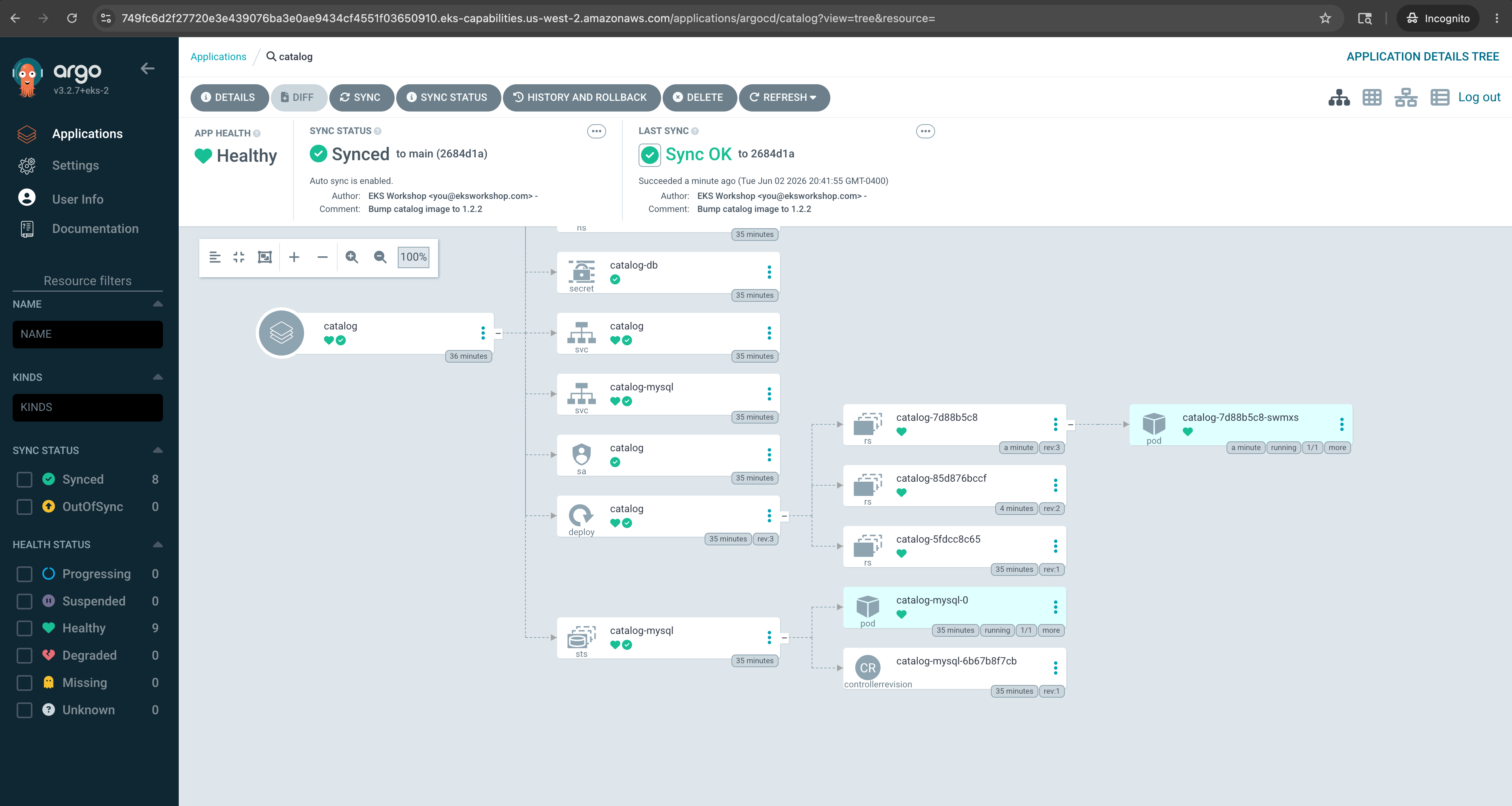
Because selfHeal is enabled, try editing the Deployment directly, for example kubectl scale -n catalog deployment/catalog --replicas=3. Argo CD detects the drift from Git and reverts it, because Git, not the cluster, is the source of truth.
That's the Argo CD lab done. You delivered the catalog service through a fully managed GitOps pipeline: a push to CodeCommit became a reconciled rollout on the cluster, with no kubectl apply and no self-managed Argo CD to operate.
Next, we'll use the kro capability to declare the complete carts stack as a single resource graph.